An AI songwriting assistant for lyrics, flow and revision.
An AI songwriting assistant helps you develop lyrics, rhyme, cadence and structure from your own intent or performance. Turn an idea or performed pocket into editable lyric routes while meaning, cadence, protected phrases and final approval stay yours.Start with the strongest material you have: your words, a performed flow or an idea. Work on one phrase, compare alternatives over your beat, and keep the changes that sound like you.
How can I write lyrics to a flow I already recorded?
Capture the phrase’s rhythm before trying to fill every space with words. Notice the entry, pauses and syllables that carry emphasis. Keep the message clear, then test possible words against that same passage.
In SongIntent: Record or upload your own articulated sketch in Flow-to-Lyrics. Use Melody Sketch for humming. Review the proposed words, edit them and perform a read-back; recognized word boundaries remain estimates from audio, not exact ground truth.
Choose the tempo and phrase range, mark a few important landings and leave room for breath. A syllable count can flag density, but only performing the line tells you how it feels.
In SongIntent: Write & Perform places word feedback beside the selected phrase: estimated layout, dictionary stress, rhyme families and fit warnings. Loop the beat and compare A · Original with B · Alternative before accepting a revision.
How can I improve my lyrics without losing my voice?
Revise the smallest passage that needs help. Keep the details and phrases that make it yours; ask for a specific change such as a clearer image or a stronger emotional turn.
In SongIntent: Set Voice DNA, add a concrete detail and an exact phrase to keep in Better lyrics, then edit the options yourself. Nothing enters the song until you choose it. Manual writing remains available after AI limits.
Compare original teaching examples, hear both versions, and decide whether the change earns its place. These are editorial exercises with synthetic spoken audio—not customer results or recordings of an AI generation session.
01 · MAKE ROOM
A crowded line, one clearer image.
The intention: The narrator says they are fine, but has been awake all night. Keep “I'm fine.”
First draft
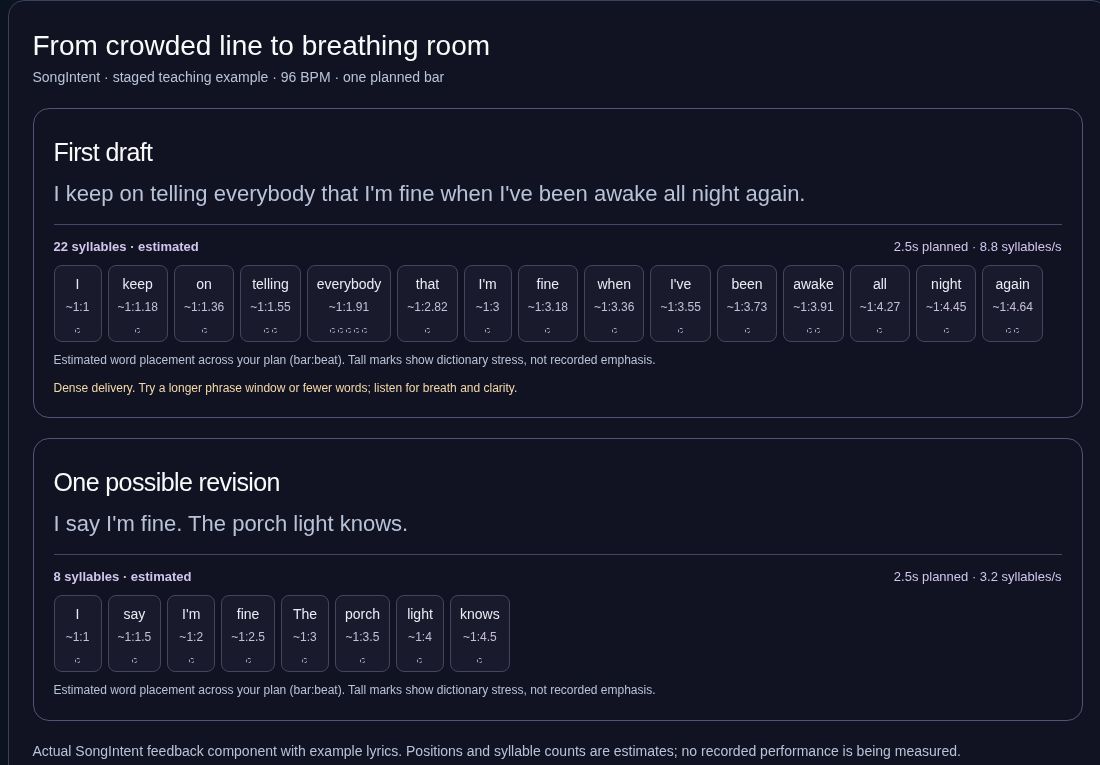
I keep on telling everybody that I'm fine when I've been awake all night again.
The first draft explains the whole situation in one breath. In this one-bar exercise, the extra setup competes with the important phrase.
One possible revision
I say I'm fine. The porch light knows.
Keep the denial and let an image reveal the sleeplessness. The pause between the two sentences becomes part of the delivery.
Listen for: Both clips use the same 96 BPM groove and synthetic voice. Count four beats before the words enter. The next four beats are the planned bar; listen for where each read-through ends.
Selected: first draft · synthetic read-through
Synthetic speech over an original beat. One-bar plan: 2.5 seconds at 96 BPM; speech starts after a 2.5-second count-in. This is an arranged illustration, not a measured user performance or an automatic timing claim.
Actual SongIntent feedback component, staged with these teaching lyrics. Word positions and syllable counts are estimates, not measured performance timing. Open the image to read it full size.Try this decision in SongIntent
Select the crowded phrase in Write & Perform and inspect Words & delivery.
In Better lyrics, keep “I'm fine” and ask for one concrete image with room for a pause.
Edit an alternative, try A and B over the same passage, then keep it only if your own performance lands.
Keep your judgment: A shorter line is not automatically better. A skilled rapper could choose a denser delivery; this revision trades explicit explanation for implication.
The intention: Show that the narrator has not accepted someone leaving. Keep the first line.
First draft
You left me standing in the rain.
My heart became a speeding train.
Rain/train gives an exact rhyme, but the train image arrives without a clear connection to this scene.
One possible revision
You left me standing in the rain.
Your key still hangs beside my name.
Keep the shared long-a sound with rain/name, and replace the abstract comparison with a key that has not been removed. That object gives the second line a job.
Listen for: Compare the ending sounds and the picture each couplet creates. The final consonants in rain/name differ: this is a slant rhyme, not an exact match.
Selected: first draft · synthetic read-through
Same synthetic speaking voice for both readings. No melody, generated song, customer testimonial or rhyme-quality score is implied.
Try this decision in SongIntent
Protect the first line and select the second line for revision.
Explore near-rhyme choices in the sound tools; bank only words that support the scene.
Write the new image, read both lines aloud, and accept the tradeoff only if it helps the song.
Keep your judgment: Near rhyme depends on pronunciation and delivery. The scene also assumes a shared key rack; choose an object that is true to your narrator.
The intention: The narrator still wants someone to find their way home. Preserve hope without promising that they return.
First draft
I am hoping you will come back someday.
I keep waiting for you every day.
The original repeats the feeling in two general statements, without giving the listener a distinctive object or phrase to carry away.
One possible revision
Leave the porch light on.
Leave the porch light on.
If you find your way back,
leave the porch light on.
Choose one visible action as a title phrase, repeat it deliberately, and use a conditional line to preserve uncertainty.
Listen for: Speak the repeated phrase back after the revision. Decide whether that clear center helps, or whether the repetition is too much for your song.
Selected: first draft · synthetic read-through
Synthetic spoken readings, not sung performances. The revision is an editorial option, not a guaranteed improvement or a finished-song render.
Try this decision in SongIntent
Name the emotional job of the chorus before asking for alternatives.
Explore hook directions, then edit one title phrase and the line that turns it.
Rehearse with your own melody; approve the final lyrics separately before using Hear Your Song.
Keep your judgment: This demonstrates wording and repetition only. A spoken example cannot establish singability, melodic lift, memorability for an audience or hit potential.
Give each four-bar block a job before rhyme or wordplay starts pulling the draft off course.
02
Flow-to-Lyrics capture
Use articulated mumble, scat or rough words as a timing reference for editable lyric options. Rehearse to check their fit against your delivery.
03
Voice controls without imitation
Set register, slang density, grammar looseness, imagery and your vocabulary—without asking for a celebrity clone.
HOW IT WORKS
From intent to a line you can perform.
1
Lock the intent
Start with the idea, title, hook, source or destination line that must survive.
2
Capture or sketch the pocket
Record articulated flow, upload a performance or set written-syllable and stress targets manually.
3
Review focused options
Generate constrained routes, punchlines or sound clouds without changing the lyric automatically.
4
Lock, test and export
Preserve approved bars, perform the lyrics back on beat and export text, LRC, SRT or DAW markers.
SONGWRITER QUESTIONS
Straight answers before you write.
What is an AI songwriting assistant?
An AI songwriting assistant helps a creator develop lyrics, rhyme, cadence and structure from supplied intent or performance. SongIntent returns editable proposals and keeps the creator responsible for the final song.
Is SongIntent an AI lyrics generator?
It can propose lyrics, but it is designed as a construction studio rather than a one-click lyrics generator. Meaning locks, cadence targets, rhyme anchors and creator approval remain visible throughout the workflow.
Which genres does SongIntent support?
SongIntent supports rap and hip-hop, pop, R&B, country and genre blends with genre-specific structure and performance guidance.
Can AI match lyrics to my flow?
SongIntent can propose lyric options from a recording with articulated vowel and consonant changes. Timing and recognition can be imperfect, so edit and rehearse the result. For pure humming, use Melody Sketch rather than treating the recording as a speech transcript.
Does SongIntent copy famous artists?
No. Voice controls use broad craft attributes such as energy, imagery, syntax and slang density. The system does not offer celebrity imitation controls.